Help CenterOrders & Fulfillment
How do I place an order on my own AliExpress account, and why is it still waiting after I paid?
8 min readOrders > the row's **Place on AliExpress**, or the order's page > **Place Order on AliExpress** card (web dashboard)
On Starter or higher, when the store's supplier (or, failing that, your default supplier) is an AliExpress or Alibaba account of your own that is connected, active and holds an access token, a ready order shows Place on AliExpress instead of Pay with card. DS-Mate creates the unpaid order on your account and opens the AliExpress orders page; you pay there, and the order waits at Awaiting AE Payment until AliExpress reports the payment. DS-Mate checks for it on its own, about every 20 minutes at first and less often (up to about once an hour) the longer the order stays unpaid, or right away when you click Mark as Paid on the list or I've paid, re-check on the order's page. DS-Mate does not bill you for the goods; Free always uses the path where DS-Mate pays the supplier.
Steps
Place the order
- On Orders, a ready order on such a store shows Place on AliExpress in place of a status badge (Place on Alibaba when an item on the order carries a supplier minimum order quantity above 1, or the order was already placed on Alibaba once; the label comes from the order, not from which account you connected). If you see Pay with card instead, see Good to know.
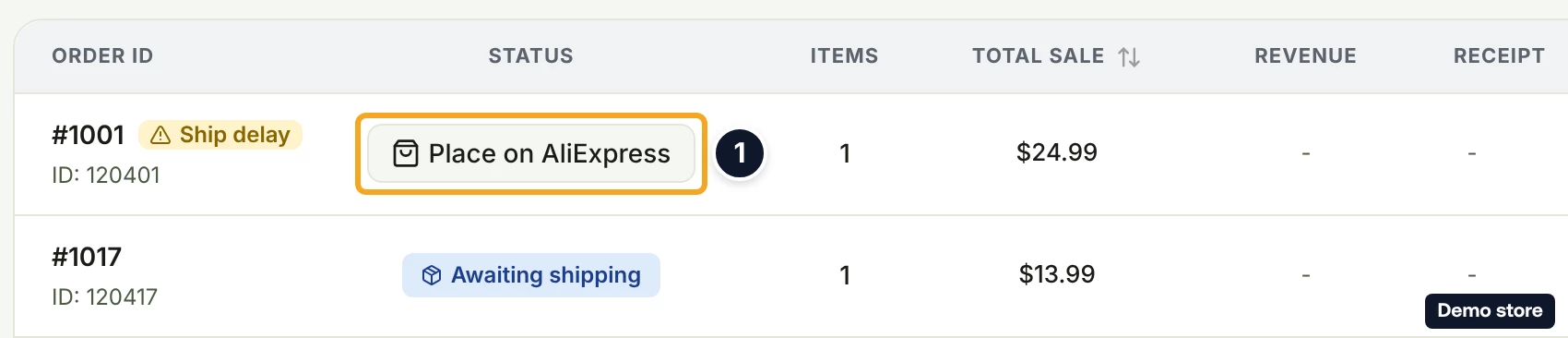
- Click Place on AliExpress (it reads Placing... while working). The toast "Order placed on AliExpress" with "Go to AliExpress to complete payment. We'll detect it and start fulfillment automatically." appears with the action Pay on AliExpress, and the AliExpress orders page opens in a new tab. For Alibaba the toast reads "Order placed on Alibaba" with "Refresh the order, then use “Pay on Alibaba” to complete payment on your Alibaba account. We'll detect it and start fulfillment automatically." If placing it would cost more than your customer paid, nothing is placed and an error message appears; open the order to place it anyway.
- To place from the order's page instead, click View details. The tracker step Supplier Payment reads "Place order on AliExpress", and the card Place Order on AliExpress reads "This order will be created on your connected AliExpress account. Go to AliExpress to complete payment. We'll detect it and start fulfillment automatically."
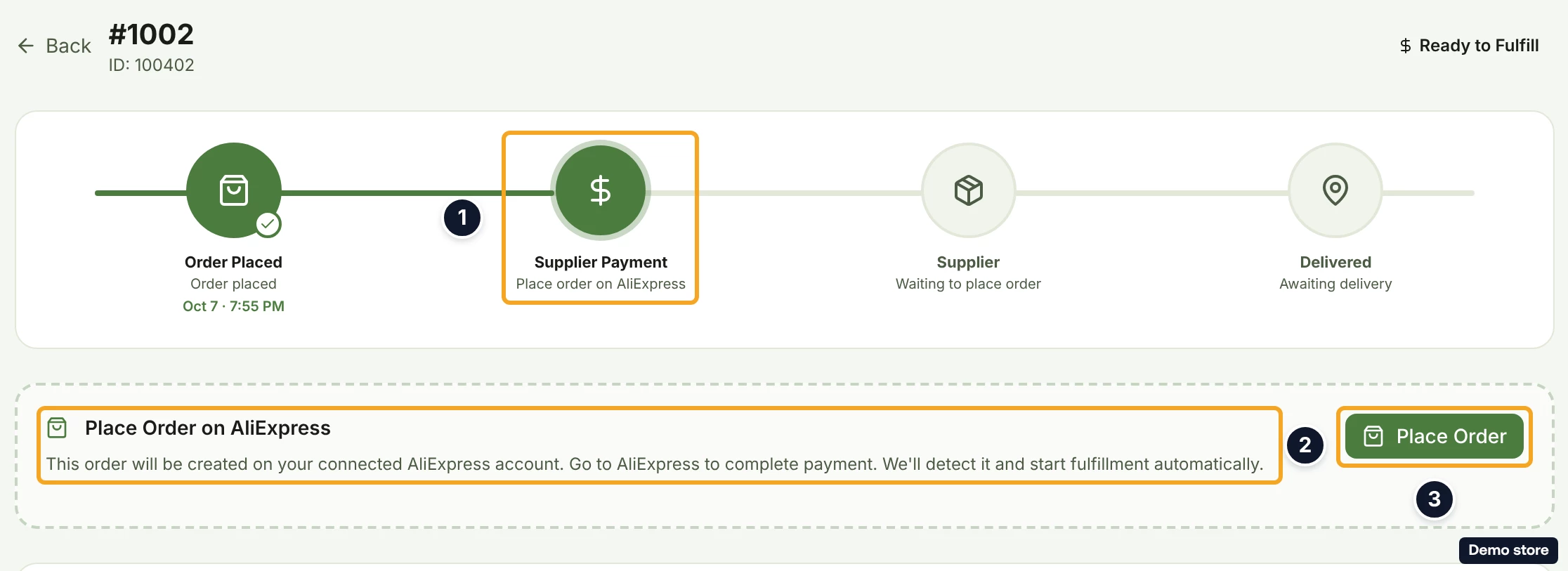
- Click Place Order. The toast "Order #<id> created on AliExpress" appears, then, briefly, "Order placed on AliExpress (#<id>)", "Go to AliExpress to pay" and "We'll detect your payment and start fulfillment automatically." If placing it would cost more than your customer paid, the dialog Place anyway and lose <amount>? opens instead ("You pay AliExpress directly, and your AliExpress price is now <price> for this order, more than the <customer total> your customer paid. Placing it would lose <amount>."), with Keep it paused and Place anyway (lose <amount>). Nothing is placed until you choose Place anyway, and while the order is paused the card shows Paused: this order would lose money. Any other failure reads "Failed to place order" with the message and the button Try Again.
- Pay for the order on AliExpress. The new tab, or the link Go to AliExpress to pay on the order's page, opens your AliExpress orders, where the new order waits unpaid; sign in with the account you connected if AliExpress asks. Later, Pay on AliExpress on the Awaiting AliExpress Payment card (step 8) opens the same page.
Check the payment
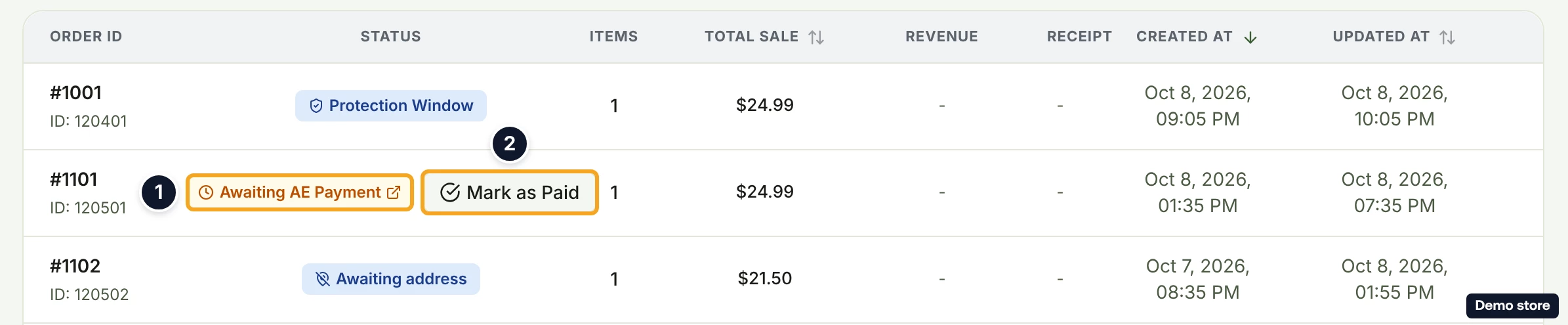
- Back on Orders, the order shows Awaiting AE Payment (tooltip "Order placed on your AliExpress account. Go to AliExpress to complete payment. We'll detect it and start fulfillment automatically."). The badge links to your AliExpress order and sits next to Mark as Paid; while there is no AliExpress order id yet, the row shows Pay on AE and Mark as Paid. On Alibaba the badge reads Payment pending.
- DS-Mate checks AliExpress for your payment on its own, about every 20 minutes at first and up to about once an hour once the order has waited several hours. To check now from the list, click Mark as Paid. The toast reads one of: "Payment confirmed, order is now processing"; "Your AliExpress order expired before payment" with "Place the order again to retry."; "This AliExpress order can no longer be paid"; or "Order not paid yet on AliExpress" with "You can check again in 10 minutes.", after which the button is locked for 10 minutes and an info icon beside it carries the tooltip "Not paid yet on AliExpress. You can check again in <m:ss>."
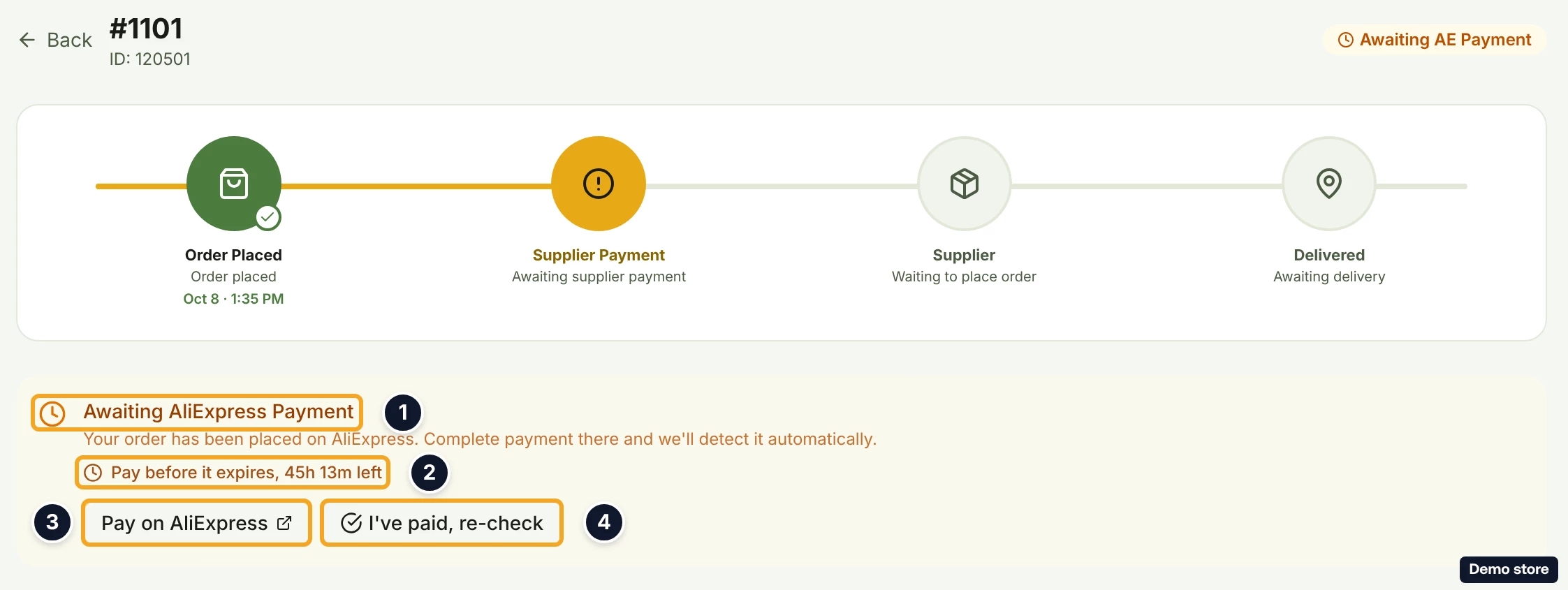
- To check from the order's page instead, read the card Awaiting AliExpress Payment: "Your order has been placed on AliExpress. Complete payment there and we'll detect it automatically.", then "Pay before it expires, <time> left" or, near the deadline, "Your AliExpress order is about to expire. Pay soon to avoid having to place it again.", or "The AliExpress payment window has expired." Pay on AliExpress opens your AliExpress order. While the order has no AliExpress order id yet, the page shows no card.
- Click I've paid, re-check (it reads Checking... while working). The toast reads "Payment confirmed, order is now processing", or otherwise "Order not paid yet on AliExpress" with "Complete payment there, then re-check." If the check itself fails, the toast reads the error message or "Failed to re-check payment status". If DS-Mate has lost access to your account, the card then shows Reconnect your AliExpress account; reconnect it under Settings > Suppliers.
- Once AliExpress reports the payment, the order moves to Awaiting shipping, then to tracking (see the tracking question).
Good to know
- The conditions for this path, all at once: Starter or higher; an AliExpress or Alibaba account connected under Settings > Suppliers; that account connected and active, with an access token; and that account set as the store's supplier, or, when the store has none, as your default supplier (see the default and backup supplier question). On Free a connected account stays connected, but every order uses the path where DS-Mate pays the supplier, and connecting an account is refused.
- Why you see Pay with card instead of Place on AliExpress: your account is disconnected or inactive; the account is neither the store's supplier nor your default; the store is assigned an account that is not yours; the account is on a platform other than AliExpress or Alibaba; or you are on Free. Reconnect it under Settings > Suppliers and the button comes back on the orders that are still ready.
- You pay AliExpress yourself, so DS-Mate writes no receipt for the order and the Receipt column reads "-". DS-Mate counts the order against your monthly order allowance (Starter 100, Growth 250), and past it takes the own-supplier rate from your service credits: Starter 40c, Growth 30c. With too few credits the click is refused with "This order needs <$x> of service credit. Top up to keep fulfilling this month." (see "What are service credits and how do I top them up?").
- On such a store, DS-Mate refuses Pay with card and Pay with service credits for a ready order: the only way through is to place it on your account.
- A Price Changed order on such a store shows no button on the list. Open the order to handle it (see the price-changed question). When the supplier cost is over the variant's max price, the order's page shows Supplier Cost Over Max Price with the max price editor (see the backup-supplier question).
- An order whose items come from more than one supplier cannot be placed this way.
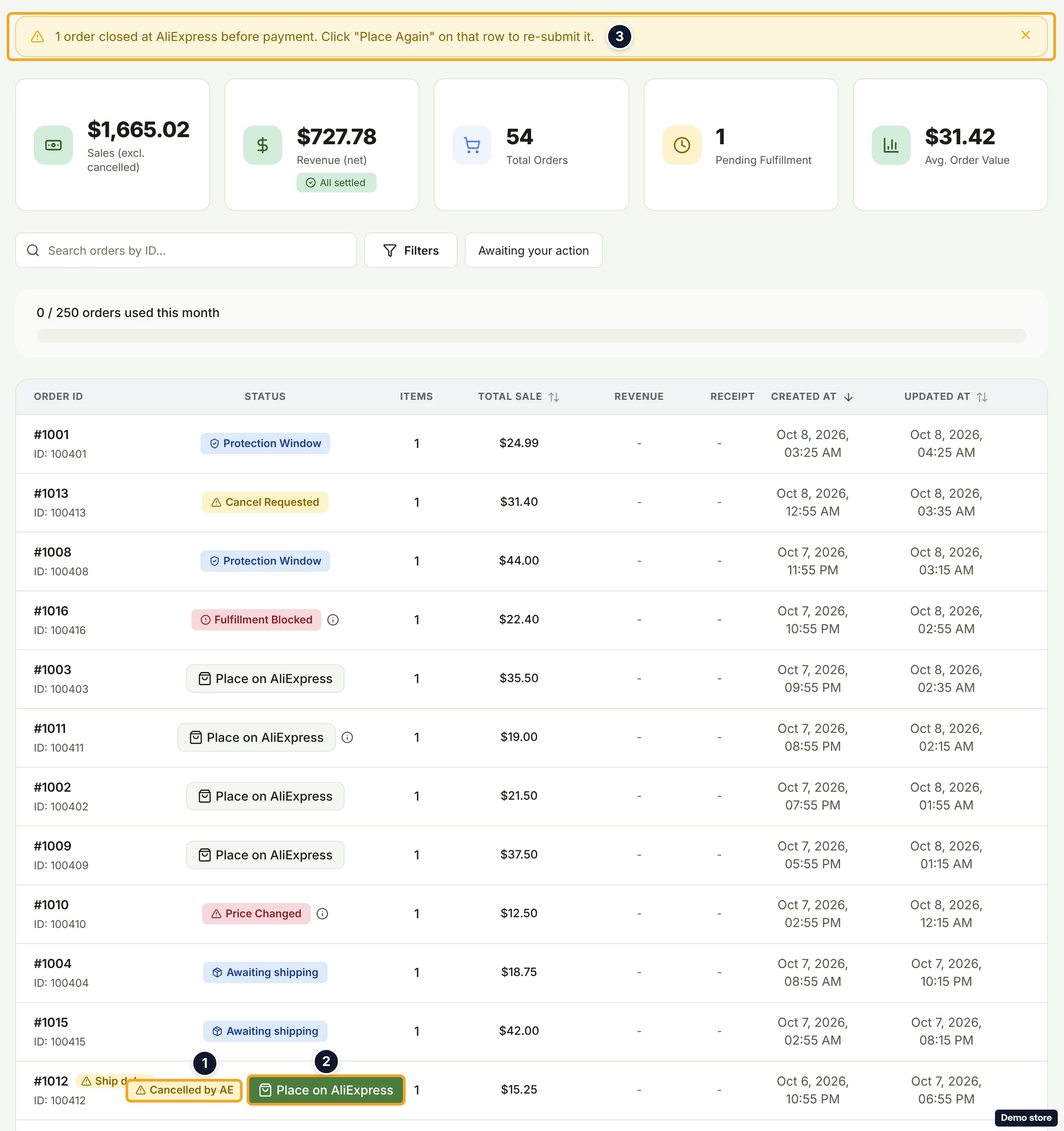
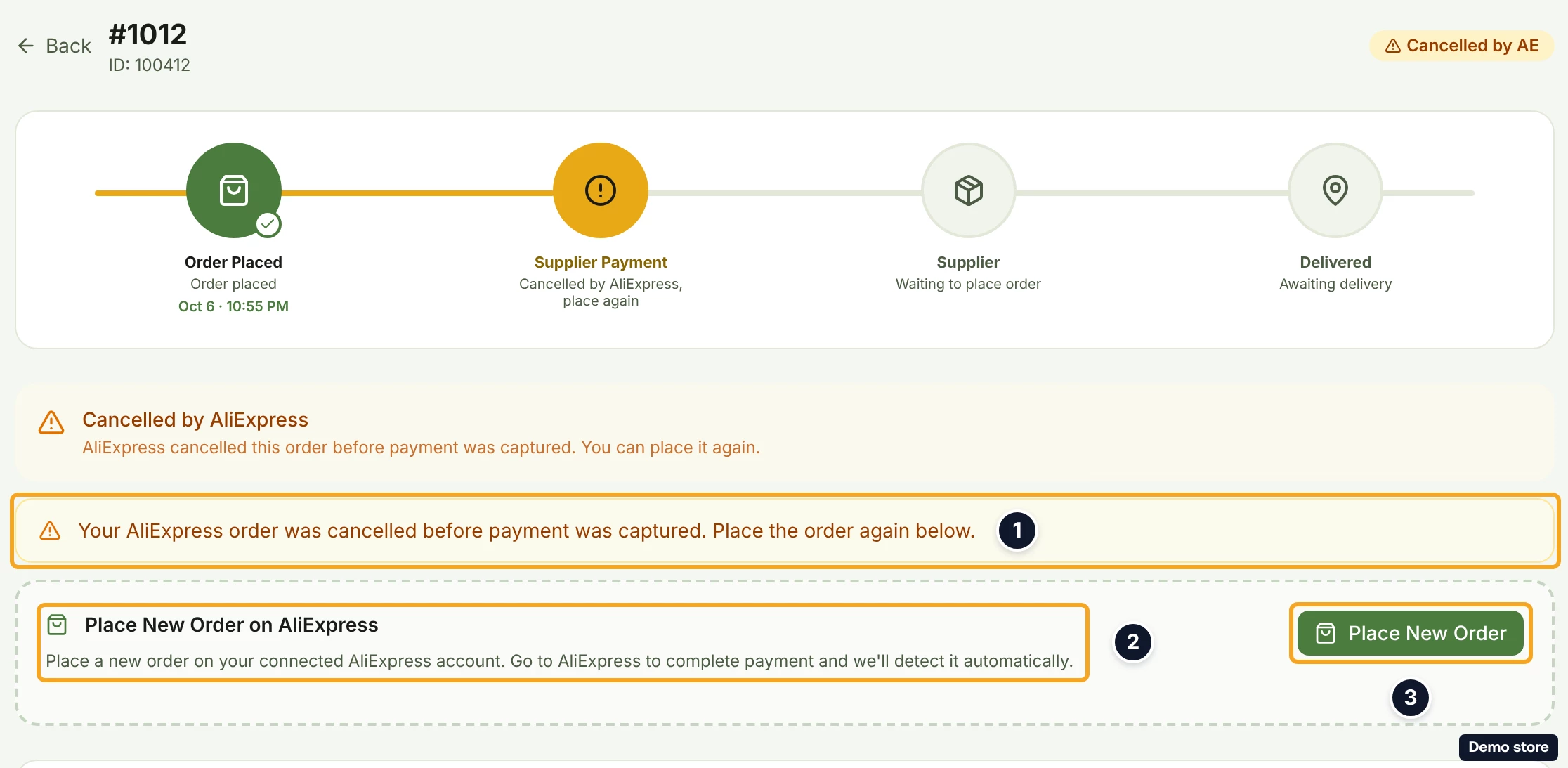
- If you do not pay before the AliExpress payment window closes, the order returns to ready. The row shows Expired at AE (or Cancelled by AE when AliExpress closed it) with Place on AliExpress beside it, and the order's page shows the card Place New Order on AliExpress under "Your AliExpress order was cancelled before payment was captured. Place the order again below." with the button Place New Order (see the supplier-cancels question).
- If your browser blocks the new tab, use the toast's Pay on AliExpress action.
- There is no notification for the placement or for the payment.
On the Shopify app
The Shopify app has no own-account path: there is no Place on AliExpress button and no Place Order on AliExpress card. For these orders the app shows Pay with card on the row and the pay panel with Pay with card and Pay with service credits on the order's page, and DS-Mate refuses those payments because the store has a usable account of your own. Place the order and check its payment from the web dashboard.
Related Articles
- Understand your orders list and its statuses
- The Protection Window on new orders
- Pay the supplier with your card or service credits
- Pay an order held for a price change
- When the supplier cancels an order
- Track a shipment and its tracking number
- Choose a store's supplier and add a backup
- Add a backup supplier and a Max Supplier Price
Still have questions?
Our support team is ready to help. Reach out and we'll get back to you as soon as possible.