Help CenterOrders & Fulfillment
Why is my new order on Protection Window, and can I end the 6-hour wait early?
7 min readOrders > the order's page > **Cancellation Protection Window** card; Settings > Stores > **Configure** (web dashboard)
A new order waits in a cancellation protection window before DS-Mate commits it to the supplier, once its items are all linked to a supplier and its first checks pass, so the buyer still has time to cancel and no supplier money moves. The window is 6 hours by default, and each store can set its own length, from 10 minutes to 48 hours, in Settings > Stores. End Window Early on the order's page is the only control on the order that ends a running window before the time shown, and it does not charge you.
Steps
Read the window
- On Orders, the order shows the badge Protection Window with a shield icon. Hover it for the tooltip "6h cancellation protection active. Eligible for fulfillment at <date, time>.", where "6h" is your store's window length (it reads like "6h", "45m" or "1h 30m").

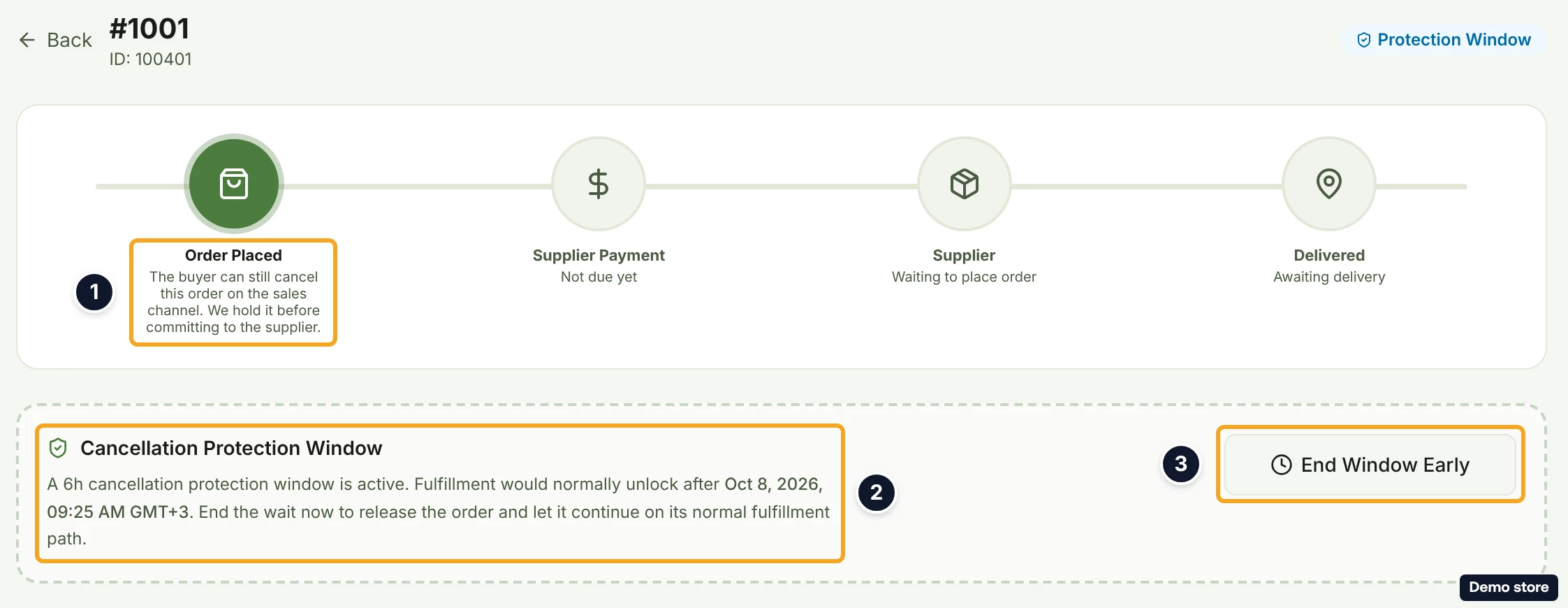
- Click View details to open the order. The tracker reads Order Placed with "The buyer can still cancel this order on the sales channel. We hold it before committing to the supplier.", Supplier Payment with "Not due yet", Supplier with "Waiting to place order" and Delivered with "Awaiting delivery".
- Read the card Cancellation Protection Window: "A 6h cancellation protection window is active." (with your store's length), "Fulfillment would normally unlock after <date, time with zone>." and "End the wait now to release the order and let it continue on its normal fulfillment path." There is no countdown, only the time.
End the window early
- Click End Window Early (it reads Ending... while working). The button shows only while the order is still in its window, is paid on the channel, and has no open buyer cancellation request.
- In the dialog End the protection window now?, read "This ends the buyer's cancellation grace period immediately. Your order then continues on its normal path. On an auto-fulfill plan it'll be paid automatically shortly; otherwise the Pay Now button appears. This action does not charge you."
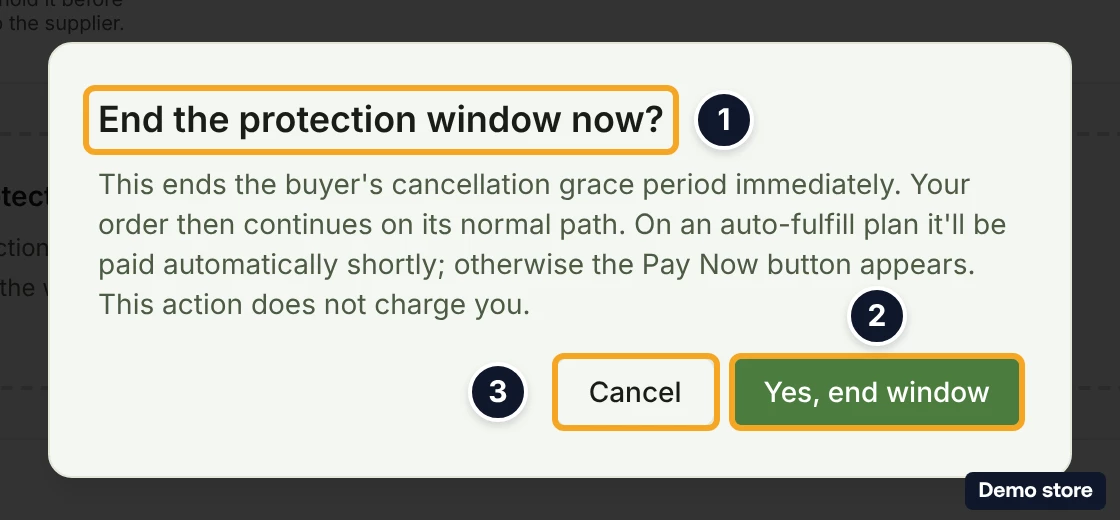
- Click Yes, end window (Cancel keeps the window running). The toast "Ending the protection window, finalizing your order…" appears. If it fails, the toast reads "Couldn't end the protection window. Try again."
- The panel reads "Finalizing your order…" with "We're re-checking this order and will move it to fulfillment in a moment. This page updates automatically, no need to refresh." After 60 seconds it reads "Still finalizing your order". DS-Mate then runs the same checks it runs when a window ends on its own (see Good to know for where the order goes next).
Change the window length for a store
- Click Settings in the sidebar.
- Click the Stores tab.
- In the banner Set a protection window per channel ("Decide how long new orders wait before auto-fulfillment, so buyers still have time to cancel. Defaults to 6h per channel."), click Configure. You need at least one store you own.

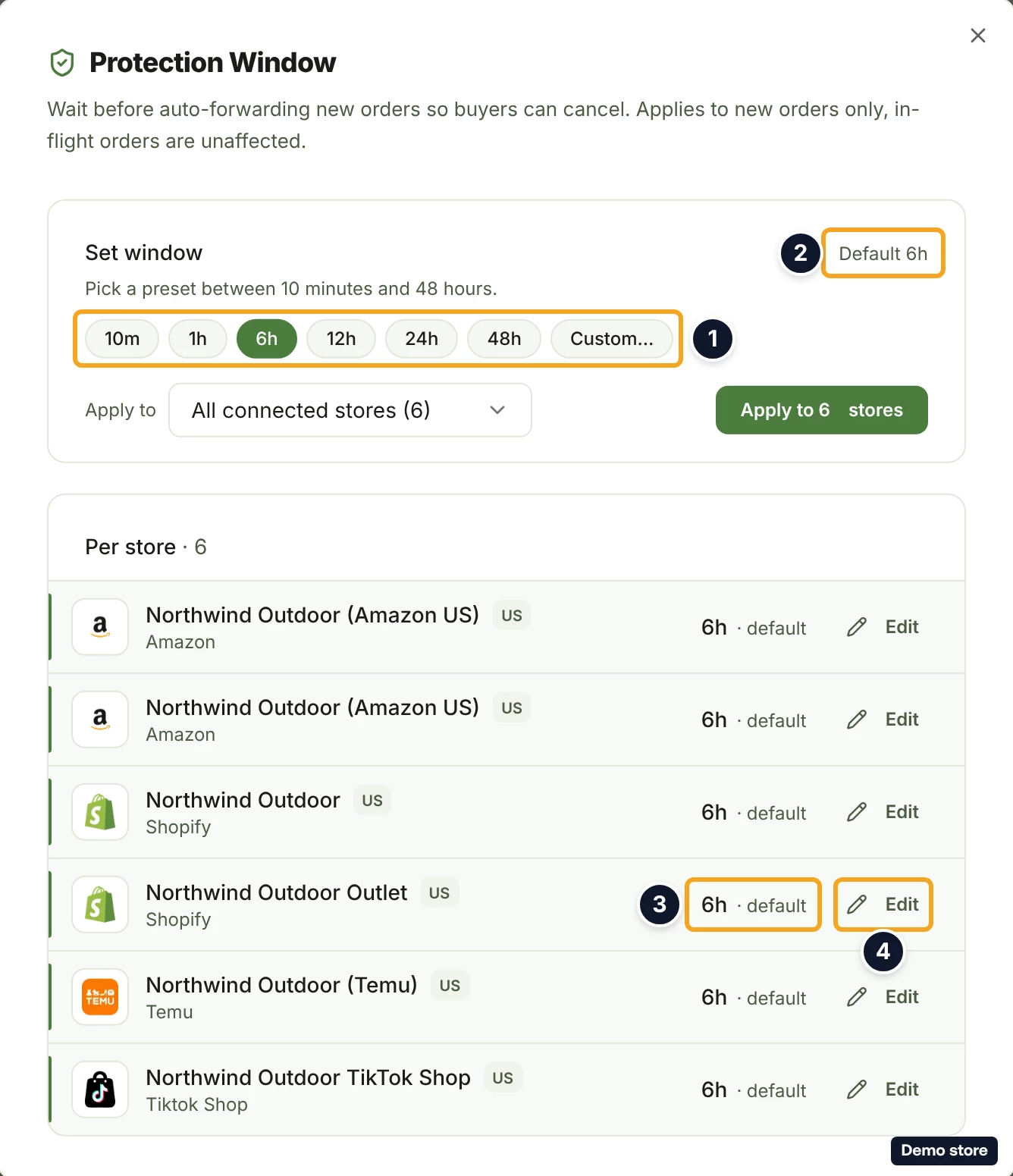
- The dialog Protection Window opens ("Wait before auto-forwarding new orders so buyers can cancel. Applies to new orders only, in-flight orders are unaffected."). In the card Set window (showing Default 6h), pick a preset: 10m, 1h, 6h, 12h, 24h, 48h or Custom…. The allowed range is 10 minutes to 48 hours.
- Under Apply to, open the list and tick the channels whose stores should get this length (All or None at the top).
- Click Apply to <n> stores. The toast "Updated <n> stores to <duration>" confirms it; if it fails, the toast reads "Failed to apply bulk update".
- To change one store on its own, in the Per store list click Edit on the store.
- Set the length.
- Click Save. The toast "<store> updated to <duration>" confirms it; the X (Cancel) leaves the store as it was. A save that fails reads "Failed to save".
- To put a store that has its own value back on the default, click Edit on that store.
- Click the icon button Reset to default (6h) (the label is its tooltip). The toast "<store> reset to default" confirms it; if it fails, the toast reads "Failed to reset".
Good to know
- The window counts from the order's creation time on the sales channel, not from when it reached DS-Mate. An order that arrives late can have little or no window left.
- The time shown is when the order becomes eligible, not when it moves. DS-Mate releases eligible orders on a sweep that runs about once an hour, so an order can stay on Protection Window up to about an hour past the time shown.
- Where the order goes when its window ends, or right after you end it early: if the buyer cancelled or was refunded on the channel, the order leaves fulfillment; if it is not paid, it stays and shows Awaiting Payment from <Channel>; with no shipping address it shows Awaiting address (see the missing-address question); if a check fails, it is held with the reason (see the hold questions). Otherwise it is paid from your service credits on its own (Placing your order) only on Starter or higher with the store's Auto-pay with credits on, no usable AliExpress or Alibaba account of your own, a supplier cost that is not above what your customer paid, and a service credit balance that covers the order; past your monthly allowance the balance must also cover your plan's per order rate. In every other case the order becomes ready for you: the row shows Pay with card (see the pay-the-supplier question) or Place on AliExpress (see the own-account question), after Checking order… for up to 60 seconds.
- Ending the window early never charges you. Under the same conditions, the order is then paid from your service credits shortly after. If your credits fall short, or paying would cost more than your customer paid, the order waits for you instead and nothing is charged.
- A buyer cancellation that arrives during the window takes the order out of fulfillment.
- An order enters the window only after its first checks pass: its items are all linked, it is ready, it has a shipping address when the channel sends one, and the supplier can serve it. An order with an unlinked item is held instead (see the unlinked-item question).
- If you try to pay an order while its window is still running (for example a held order whose re-check lands it back in the window), DS-Mate refuses with "This order is inside the buyer's cancellation window, so it cannot be sent to the supplier yet. It will be fulfilled automatically after <time>."
- Ending the window sends no notification of its own. Three order entries can reach the bell: "Order <id> needs your attention" when a placement fails; "Order <id> is waiting for credits" (or "<n> orders are waiting for credits"), with an email to the store owner, when auto-pay holds orders because your service credits are short, which can happen right as a window ends; and "Order <id> is paused: it would lose money", with an email, when paying the order would cost more than your customer paid.
On the Shopify app
The order's page shows the same Cancellation Protection Window card, the same End Window Early button and the same confirm dialog. There is no protection window settings screen in the Shopify app: change a store's window length from the web dashboard under Settings > Stores.
Related Articles
Still have questions?
Our support team is ready to help. Reach out and we'll get back to you as soon as possible.