Help CenterOrders & Fulfillment
My supplier cancelled my order. What do I do now?
9 min readOrders > the order's row, and the order's page (web dashboard)
It depends on which of three closures you are looking at, and the order's badge tells you which. "Cancelled by AE" or "Expired at AE" means AliExpress closed the supplier order before AliExpress was paid: the order is back to ready and, unless you already paid DS-Mate for it (see Good to know), you place it again from its row or its page. "Supplier refunded" means AliExpress closed it after payment and refunded DS-Mate: it cannot be placed again, and on Starter or higher the item cost of an order paid with Service Credit goes back to your Service Credit automatically.
Steps
Tell the three closures apart
- Click Orders in the sidebar.
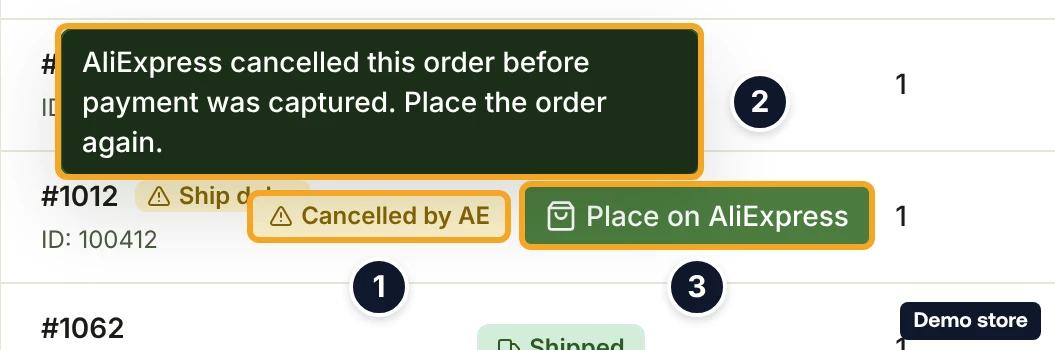
- Read the badge on the order's row. An unpaid closure shows "Cancelled by AE", or "Expired at AE" when the pay window ran out; both are amber. Hover it for the tooltip "AliExpress cancelled this order before payment was captured. Place the order again." or, for an expiry, "This AliExpress order expired before it was paid. Nothing was charged. Place the order again."
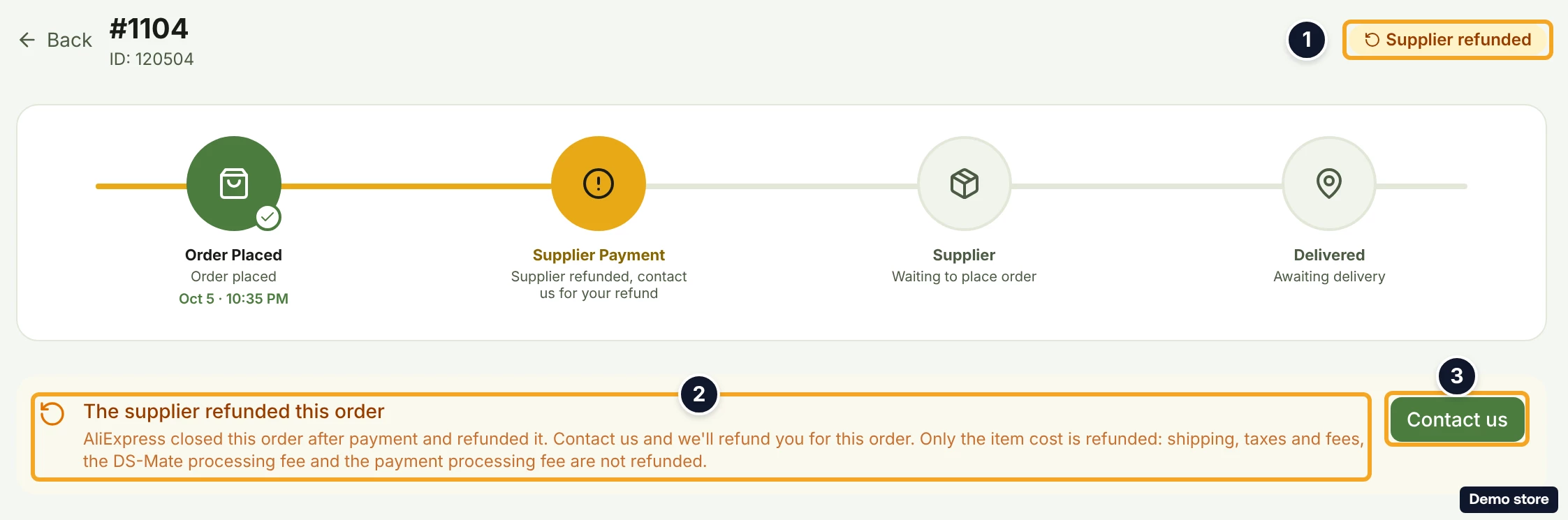
- A paid closure shows "Supplier refunded". While support still owes your refund, the tooltip reads "The supplier refunded this order. Only the item cost is refunded: shipping, taxes and fees, the DS-Mate processing fee and the payment processing fee are not refunded. Contact us if you haven't received your refund yet." When the item cost already went back to your Service Credit, it reads "The supplier refunded this order. We returned the item cost, <amount>, to your service credits. Only the item cost is refunded: shipping, taxes and fees, the DS-Mate processing fee and the payment processing fee are not refunded."
- A closure DS-Mate cannot explain shows "Failed". Only support can clear it.
Place an unpaid closure again
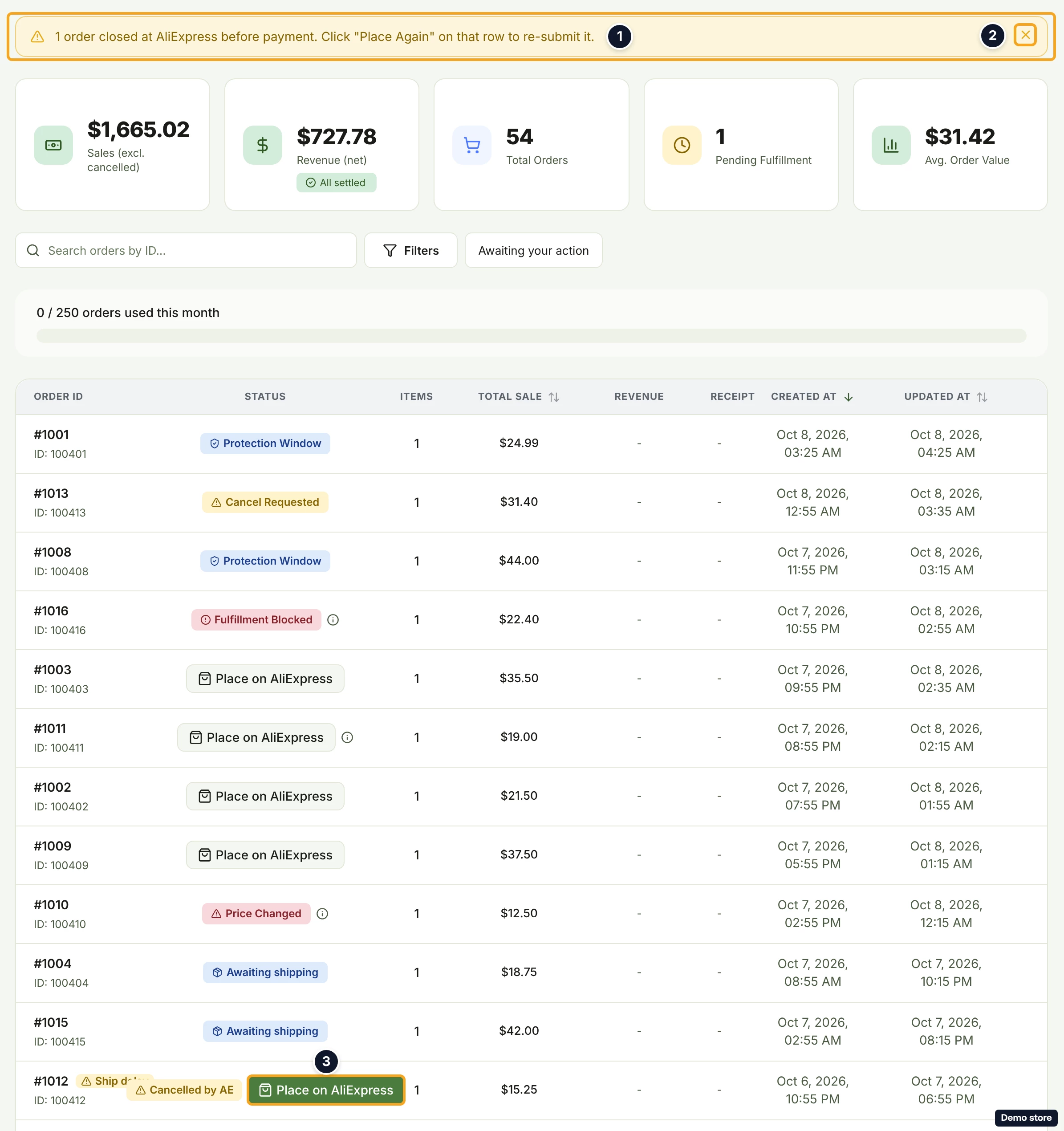
- Above the list, a banner counts these orders: "1 order closed at AliExpress before payment. Click "Place Again" on that row to re-submit it." (with several: "<n> orders closed at AliExpress before payment. Click "Place Again" on each row to re-submit."). No button is called "Place Again": the row's button in the next step is the one to use. The X icon (its label is "Dismiss") hides the banner. It counts only the closed orders on the page you are viewing.
- Beside the badge, the row shows Place on AliExpress when your own AliExpress account can be used, otherwise Pay with card (or Resume Payment if a checkout is already open). Clicking it starts the same placement as for a new order (see the fulfil and pay question and the own-account question).
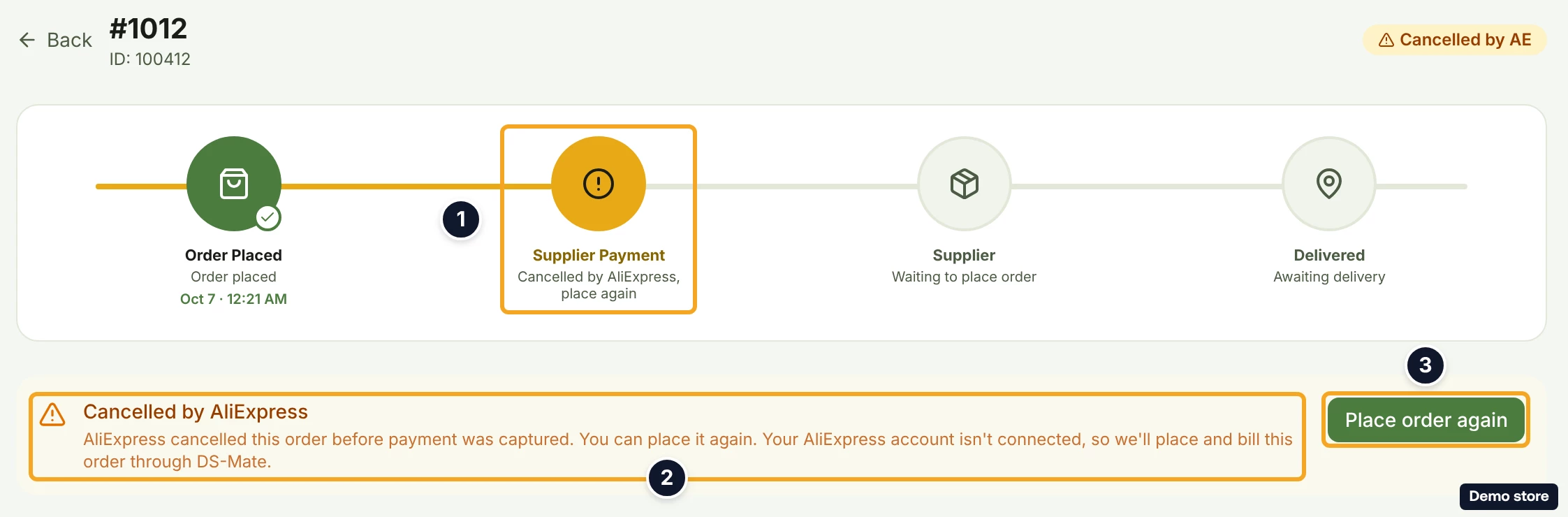
- Or open the order. The header carries the same badge, and the tracker reads "Order Placed" with "Order placed", "Supplier Payment" with "Cancelled by AliExpress, place again" (amber), "Supplier" with "Waiting to place order", and "Delivered" with "Awaiting delivery". The "Shipment progress" card is hidden for a supplier order that was cancelled before it shipped.
- When DS-Mate places and pays for you (your AliExpress account is not connected, or cannot be used), the card "Cancelled by AliExpress" gives the reason, for example "AliExpress cancelled this order before payment was captured.", followed by "You can place it again.". If you connected AliExpress before and it can no longer be used, it adds "Your AliExpress account isn't connected, so we'll place and bill this order through DS-Mate." The card title reads "Cancelled by AliExpress" for an expiry too, while the badge reads "Expired at AE".
- Click Place order again (it reads Processing... while working). This button always pays by card. The toast "Redirecting to payment…" takes you to the payment page. A refused click shows no "Redirecting to payment…" toast. Two toasts appear instead: one with the reason, and a general one such as "This order couldn't be auto-fulfilled. Please try fulfilling it manually or contact support."
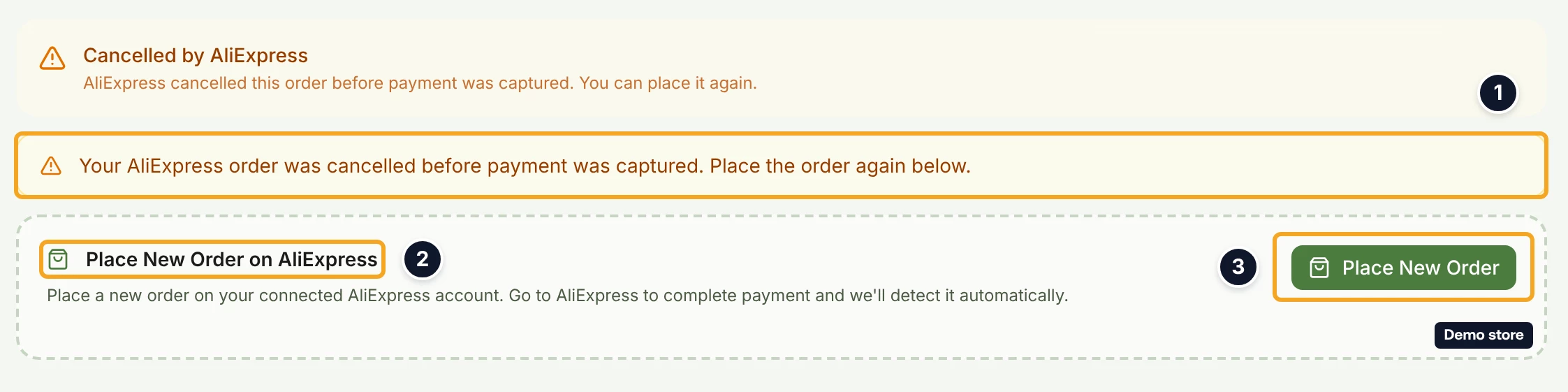
- When your own AliExpress account can be used, the same card shows without the button. Below it, an amber line reads "Your AliExpress order was cancelled before payment was captured. Place the order again below." (it reads the same for an expiry), then the section "Place New Order on AliExpress".
- Click Place New Order.
- On success, the toast "Order #<id> created on AliExpress" appears, and the section shows the line "We'll detect your payment and start fulfillment automatically." The link Go to AliExpress to pay shows with it when AliExpress returned the page to pay on.
- Pay the order on AliExpress.
- On failure, the section reads "Failed to place order" with the button Try Again. If your AliExpress price for the order is now more than your customer paid, a dialog asks "Place anyway and lose <amount>?" first. Click Place anyway (lose <amount>) to go ahead, or Keep it paused.
A paid closure the supplier refunded
- Open the order. The badge reads "Supplier refunded", and the tracker's second step reads "Supplier refunded, contact us for your refund", or "Supplier refunded, item cost returned to your credits" when the item cost already went back to your Service Credit.
- While support still owes your refund (an order paid by card, or the Free plan), the card "The supplier refunded this order" reads "AliExpress closed this order after payment and refunded it. Contact us and we'll refund you for this order. Only the item cost is refunded: shipping, taxes and fees, the DS-Mate processing fee and the payment processing fee are not refunded." When the item cost already went back to your Service Credit, the same card reads "AliExpress closed this order after payment and refunded it. We returned the item cost, <amount>, to your service credits. Only the item cost is refunded: shipping, taxes and fees, the DS-Mate processing fee and the payment processing fee are not refunded." and has no Contact us button. Neither version has a place-again button.
- Before you write to us, open the notification bell. A paid closure sends "Supplier refunded order <#n>", and an email follows. When the order was paid with Service Credit on Starter or higher, the body reads "AliExpress closed order <#n> in <store> after payment and refunded it. We returned the item cost, <amount>, to your service credits. Only the item cost is refunded: shipping, taxes and fees, the DS-Mate processing fee and the payment processing fee are not refunded." The item cost is then already back in your Service Credit, and the ledger in Settings shows a "Refund" row reading "Item cost refund: supplier closed order <id>" (the id as DS-Mate stores it, with its channel prefix). The card on the order's page says the same, with the amount, and has no Contact us button.
- When the bell body reads "Contact us and we'll refund you for this order." instead (an order paid by card, or the Free plan), click Contact us on the card. It opens the support form prefilled with the billing category. DS-Mate also opens a support ticket on its side for every paid closure.
- Once support has refunded you and released the order, it returns to the list as an order to place again: the badge tooltip reads "AliExpress closed this order after payment and we have refunded you for it. Only the item cost is refunded: shipping, taxes and fees, the DS-Mate processing fee and the payment processing fee are not refunded. Place the order again." and the tracker's second step reads "Refunded by DS-Mate, place again". If Place order again or Pay with card then answers with a toast beginning "This order has already been paid with", reply to support: the order cannot be placed again from the dashboard today.
A closure DS-Mate cannot explain
- Open the order. The badge reads "Failed" and the tracker reads "Supplier" with "Fulfillment failed".
- The card "We couldn't fulfill this order" reads "Something went wrong placing this order with the supplier and it won't clear on its own. Contact support and we'll unblock it for you." Click Contact support. You cannot clear this one yourself; DS-Mate opens a ticket for it as well.
Good to know
- An unpaid closure sends no bell and no email. The only signals are the list banner, which you can dismiss, and the row badge, which stays until you place the order again. Check Orders after a supplier cancellation rather than waiting for a notification.
- If you already paid DS-Mate for the order (by card or Service Credit) before AliExpress closed it, placing it again does not charge you a second time: a toast beginning "This order has already been paid with" answers that nothing was charged (a second toast, "This order couldn't be auto-fulfilled. Please try fulfilling it manually or contact support.", shows next to it). Contact support about the order then.
- Placing again does not switch to your backup supplier. It uses the item's current supplier link. To use the backup, change the link on the product first, then place the order again (see the backup supplier question).
- DS-Mate does not refund or cancel your buyer's order on your store. If you decide not to fulfil the order, do that on the sales channel yourself.
- Money on a paid closure: only the item cost comes back, only to Service Credit, only on Starter or higher, and only when the order was paid with credits. Shipping, taxes & fees and processing fees are kept. An order paid by card, or any order on Free, is refunded by support after you click Contact us.
- Place order again on the order's page always pays by card. To place through your own AliExpress account instead, use Place New Order when that section shows, or Place on AliExpress on the row.
- An order with several supplier orders: when one of them closes unpaid while another is still live, the order does not go back to ready.
- The orders list has no filter for supplier-cancelled orders on their own. The "Awaiting your action" filter includes them, with every other order that waits for you; otherwise look for the amber badges or the banner.
- Orders placed with a partner supplier rather than AliExpress notify you differently: when the partner refunds you, the bell reads "Action needed: refund your buyer for order <#n>".
On the Shopify app
The notice is titled "Supplier order was cancelled" or "Supplier order expired before payment", with a body ending "retry to re-submit it to the supplier." It has no place-again button. On a paid closure, the notice "The supplier refunded this order" shows Contact us, which opens a prefilled email, only while support still owes your refund; once the item cost is back in your Service Credit, the notice says so and has no Contact us.
Related Articles
Still have questions?
Our support team is ready to help. Reach out and we'll get back to you as soon as possible.