Back to Help Center
Help CenterTeam & Guests
What can a guest do in my store?
3 min readSettings > Stores (web dashboard)
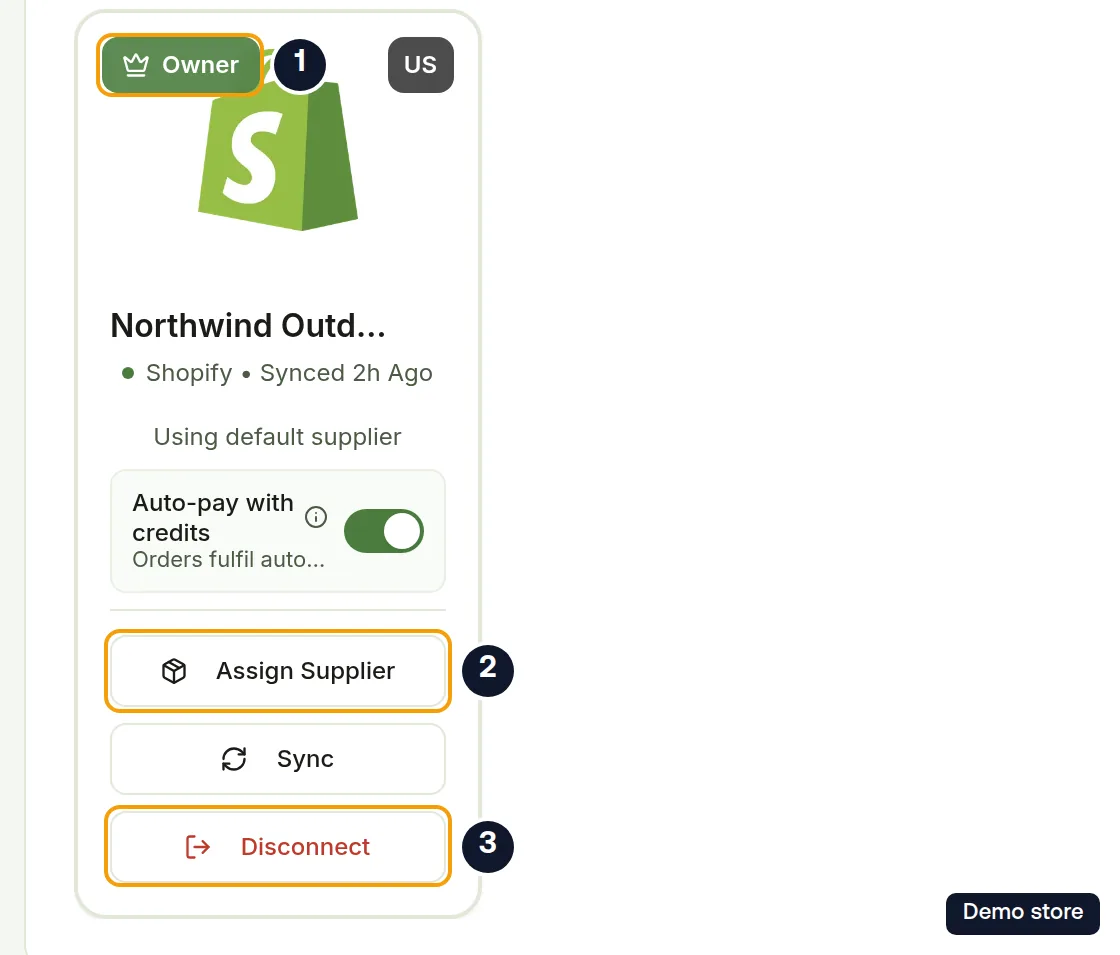
A guest can open the store you shared, work on its orders and products, run Sync, and pay for an order by card. A guest does not get controls to rename the store, assign its supplier, disconnect it, invite others or change your billing and credit settings. A guest is someone who accepted your invitation; their store card shows a Member badge, and they work from their own DS-Mate account while the store stays yours. Orders paid with credits draw on your wallet, not theirs.
Steps
What a guest can do
- Open the shared store and work on its orders and products. On the store card they see Sync while the store is active.
- Open an order. When your credits run short, the guest sees "The store owner is out of service credits" ending with "Ask the store owner to top up, or pay for this order by card." The balance is labelled Owner's balance and there is no Top up credits button.
- Manage their own account under Settings: Profile, Security, Notifications, Stores, Suppliers, Supplier access, Plan & Billing, Service Credit and Referrals all refer to the guest's own account, not yours.
What only the owner can do
- Edit the store name, and use Assign Supplier, Disconnect and Reauthorize on the store card.
- Switch the service-credit auto-pay setting. The auto-pay switch does not appear on a guest's store card.
- Invite guests to the store. A guest without stores of their own does not see Invite Guest or Store Invitations at all.
- A few order actions, such as confirming an item as out of stock.
Leave a store you were invited to
- Open Settings, then Stores.
- Find the store card with the Member badge.
- Click Remove Self.
- The dialog Remove Yourself from Store names the store and asks whether you are sure, then warns "You will lose access to this store immediately."
- Click Remove Self. Cancel keeps your access.
- You see "Removed from store successfully" and the store leaves your list. The owner's guest seat is freed.
Good to know
- A guest is not read-only. They can run Sync, pay for orders by card, and link or relink a product's variants to supplier products. Links a guest makes count toward your plan's linked-variant allowance. If you do not want someone doing that, do not invite them.
- Leaving a store is immediate. To come back, the owner has to invite you again.
- The owner removes a guest from the Guests tab under Store Invitations; the guest can also leave on their own with Remove Self.
On the Shopify app
In the Shopify app, Billing and Service Credits stay in the menu for a guest. Inside each of those pages, a Contact the store owner card shows in place of the owner's controls. On Billing it reads "Plan changes, service credits, and billing are managed by the store owner. Please contact them for any subscription or payment updates." with the link View plan at ds-mate.com. On Service Credits it reads "Purchasing credits, auto-reload, and service credit settings are managed by the store owner. Please contact them for any changes." with the link View credits at ds-mate.com.
Related Articles
Still have questions?
Our support team is ready to help. Reach out and we'll get back to you as soon as possible.