Help CenterBilling & Credits
How do I cancel my subscription, or undo a cancellation?
4 min readSettings > Plan & Billing (web dashboard)
Click Cancel Subscription on Plan & Billing and choose Cancel & Keep Data. Your plan stays active until the end of the billing period you paid for, then your account moves to the Free plan, which keeps 1 store and no guests: the stores you do not keep are disconnected, and their orders and products are kept for 60 days. Until the end date you can keep your plan with the "Keep my" button, such as "Keep my Growth plan", or by turning Auto-Renew back on.
Steps
Cancel your plan
- Click Settings at the bottom of the sidebar.
- Click Plan & Billing. The page heading reads "Billing".
- Click Cancel Subscription on your plan card.
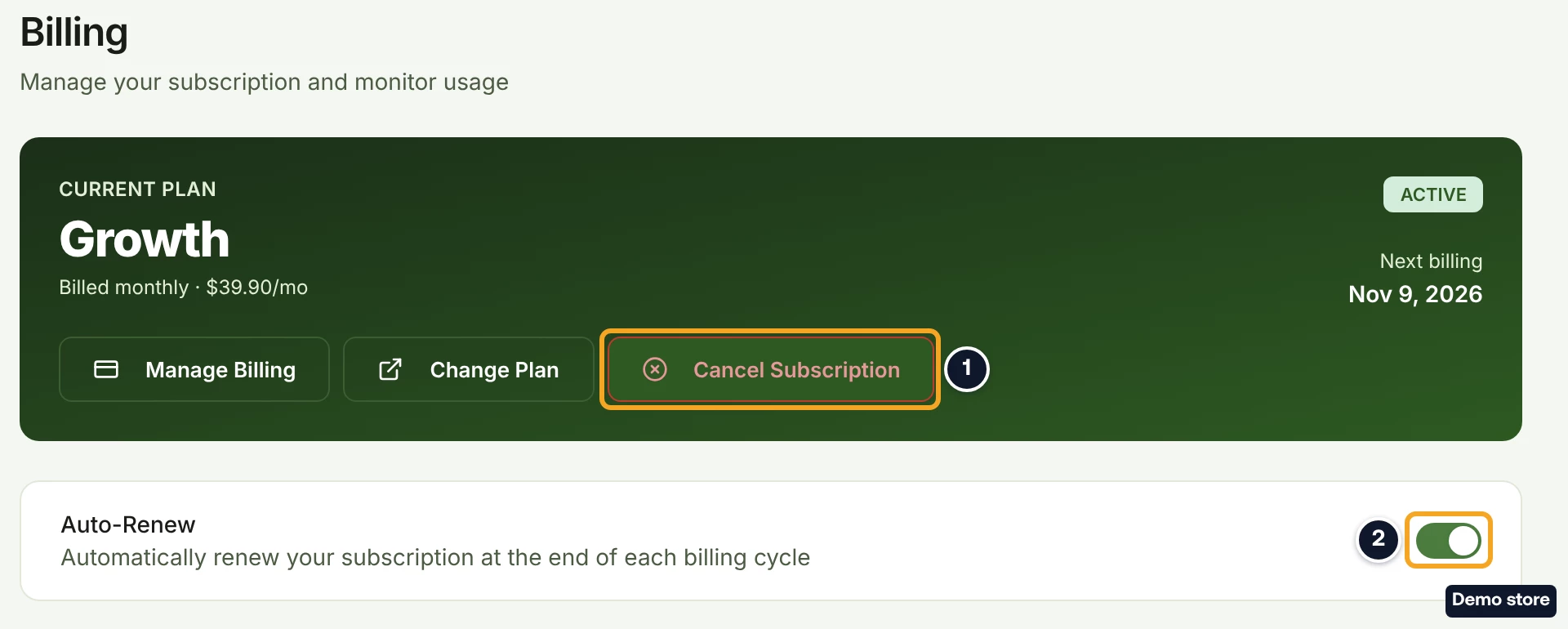
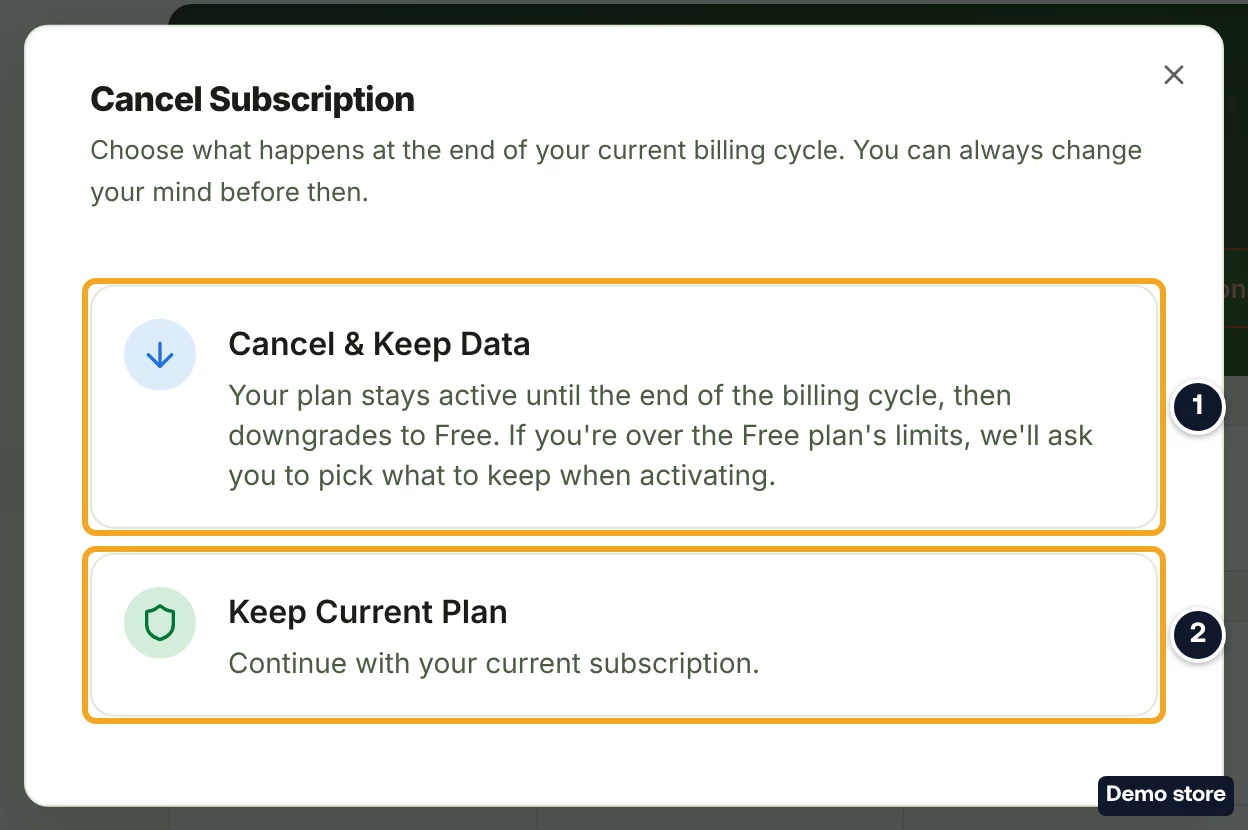
- The Cancel Subscription dialog opens: "Choose what happens at the end of your current billing cycle. You can always change your mind before then."
- Click Cancel & Keep Data: "Your plan stays active until the end of the billing cycle, then downgrades to Free. If you're over the Free plan's limits, we'll ask you to pick what to keep when activating." To close the dialog without changing anything, click Keep Current Plan instead.
- The toast reads "Cancellation scheduled" and "Your <Plan> plan stays active until <date>, then moves to Free."
What you see until the end date
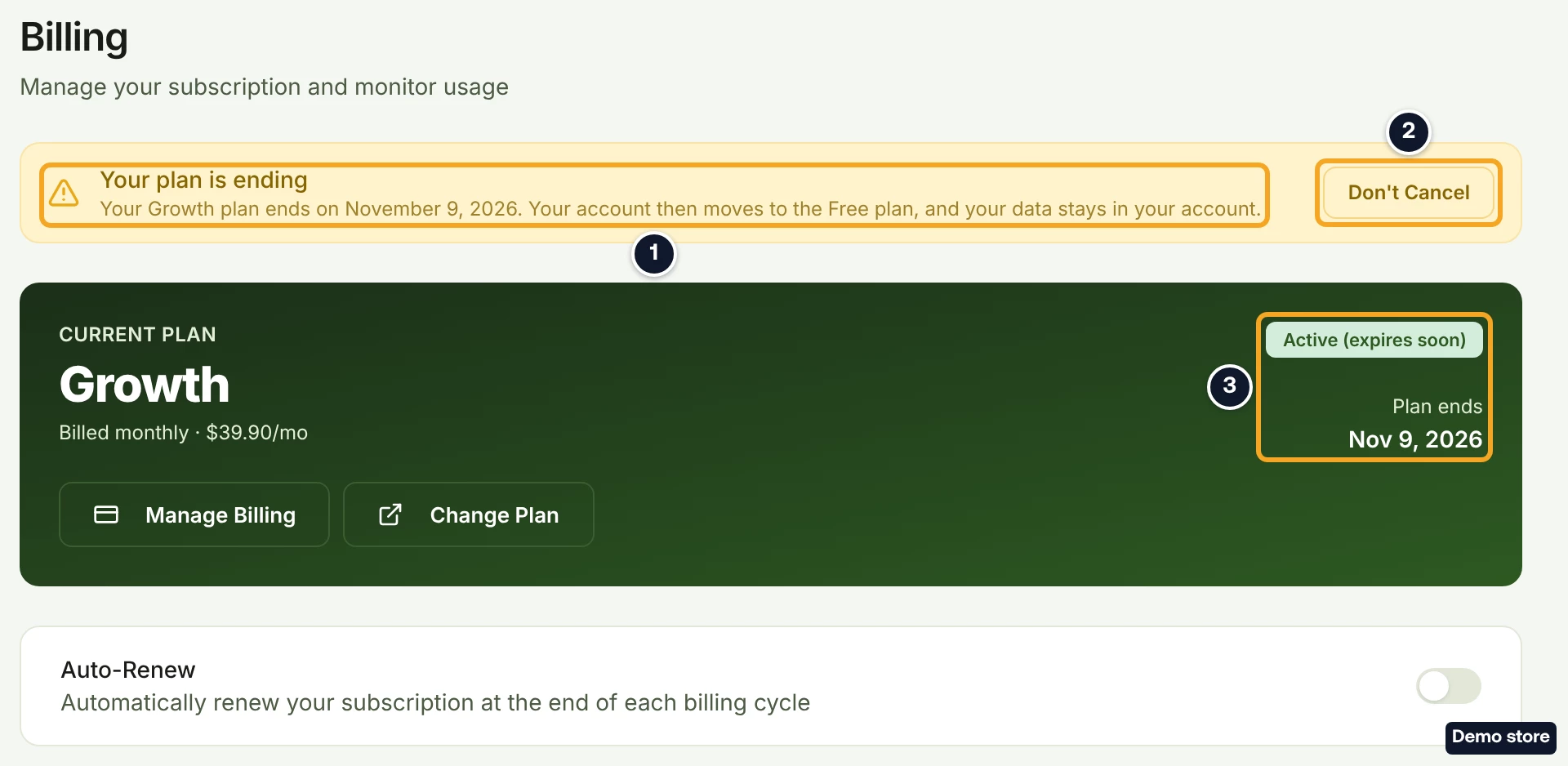
- Plan & Billing shows "Your plan is ending": "Your <Plan> plan ends on <date>. Your account then moves to the Free plan, and your data stays in your account." with a button named after your plan, such as "Keep my Growth plan". Right after cancelling, this box can read "Plan Change Scheduled" with "Changing to Free on <date>" for a short while instead.
- Your plan card shows the badge "Active (expires soon)" and "Plan ends" with the date. Cancel Subscription is no longer shown, and the Auto-Renew switch is off.
- In the last 30 days, a banner at the top of every page reads "Your <Plan> plan ends in <n> days, then moves to Free." with the link Renew your plan. That link opens the plans page; it does not undo the cancellation.

Keep your plan
- On Plan & Billing, click the "Keep my" button in "Your plan is ending", such as "Keep my Growth plan". The toast reads "Your Growth plan will renew as usual."
- Or turn the Auto-Renew switch back on. The toast reads "Auto-renewal enabled".
On the end date
- Your account moves to the Free plan.
- If you have more than 1 store or any guest, the next dashboard page you open shows a step you cannot close: Select Stores to Keep when you have more than 1 store, or Remove Excess Guests when only guests are over. The dashboard stays blocked until you finish it. Stores you do not keep are disconnected and kept for 60 days.
- If DS-Mate shows a page of plans when you next sign in, your plan has ended. Your old plan's card reads Resubscribe, a higher plan reads Upgrade or Subscribe, a lower paid plan reads Downgrade or Subscribe, and Free reads Downgrade to Free.
- To stay on Free, click Downgrade to Free. If you are over Free's limits, the step that asks what to keep opens first. If it fails, contact support.
Good to know
- To keep your plan, use the "Keep my" button, such as "Keep my Growth plan", or turn Auto-Renew back on. Renew your plan in the top banner opens the plans page, where your current plan's card cannot be clicked. If you see Plan Change Scheduled right after cancelling, its "Keep my" button keeps your plan too.
- Turning Auto-Renew off is a cancellation. There is no confirmation dialog: the toast "Auto-renewal disabled" shows, and the page then reads "Your plan is ending". Downgrade to Free on the pricing page also ends your paid plan.
- Cancelling in DS-Mate never ends your plan early. It runs to the end of the billing period you paid for.
- Your service credits stay in your account, but they cannot be spent on Free. Credits are for Starter and above.
- During a trial there is no Cancel Subscription button. If your trial is set to continue automatically, turn Auto-Renew off before the date it would charge you.
On the Shopify app
Cancel & Keep Data cancels the Shopify charge straight away, with no refund for the period you paid, and your plan stays active in DS-Mate until the end of that period. If renewal is already off, the dialog reads "Cancellation Already Scheduled". Renewal cannot be turned back on, either in the app or with Auto-Renew on the web dashboard. Your plan ends on the date shown, and after that you can subscribe to it again from your plans.
Related Articles
Still have questions?
Our support team is ready to help. Reach out and we'll get back to you as soon as possible.