Help CenterAccount & Security
How do I delete my DS-Mate account, and can I undo it?
4 min readSettings > Profile, the "Delete your account" card at the bottom (web dashboard). Every plan; owners and guests each delete only their own account.
Open Settings > Profile and use the last card, "Delete your account", where you confirm with your password and by typing DELETE. To undo it, sign in again within 7 days; no message confirms it. After the 7 days the account is closed, not erased at once: your data is kept for at least 60 days and support can restore it in that time.
Steps
Ask for the deletion
- Click your avatar at the top right.
- Click Settings. Profile opens first.
- Scroll to the last card, "Delete your account", "Permanently remove your account and all associated data after a 7-day grace period."

- Click Delete Account. The dialog "Delete Account" opens: "Your account is closed when the grace period ends. Your data is then kept for at least 60 days, and support can restore it in that time. If you have a paid plan, it stops renewing now; nothing is refunded."
- If you like, type your reason in Feedback. It is optional.
- Type your password in Password.
- Type DELETE in capitals in Type DELETE to confirm. The dialog notes "You have 7 days to cancel by logging back in." The Delete Account button stays dimmed until the field reads exactly DELETE and a password is typed.
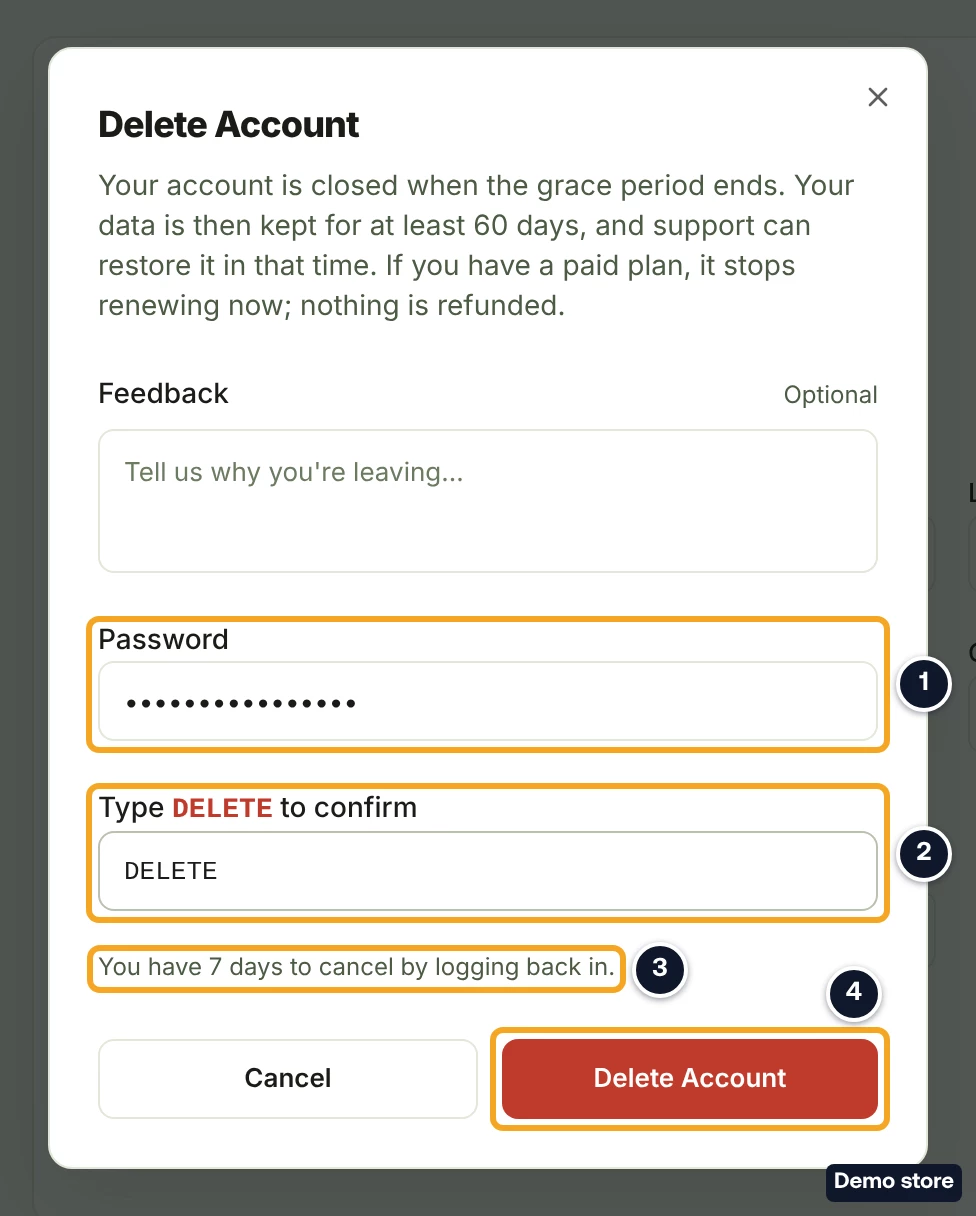
- Click Delete Account. It reads Deleting... while it works. A wrong password shows "Incorrect password" under the field. To stop here instead, click Cancel.
- A toast reads "Account deletion scheduled" for a moment, then you are signed out to the DS-Mate home page. Other devices are signed out at their next action. An email, "Sorry to see you go", gives the date your account will be closed. It is sent only for your first request.
Undo it within 7 days
- Sign in again with your email and password (and your two-factor code, if it is on) within 7 days of the request.
- Check that the dashboard opens as usual. That is the only sign the deletion is cancelled: no message or email confirms it. If your plan was set to renew before the request, it renews again.
After the 7 days
- If you sign in after the 7 days, the dashboard shows "Account Scheduled for Removal": "This account is scheduled for removal. Support can restore it within 60 days of the deletion: write to support@ds-mate.com."
- Click Email support to ask for the account back, or Sign out.
Good to know
- The 7 days are not a pause. Your stores keep syncing and your orders keep processing until the account is closed.
- Your plan. A plan billed by card on the web dashboard stops renewing when you ask, and nothing is refunded. If you cancel the deletion, renewal goes back on if it was on before. When the account is closed, a card plan still running is cancelled at once, with no partial refund. A plan billed through Shopify is not changed by the deletion request, so Shopify keeps billing during the 7 days. When the account is closed, DS-Mate removes its app from the Shopify stores only you use, and Shopify ends the app's charge with it. To stop the charge sooner, uninstall DS-Mate from Shopify Admin > Apps. Nothing in the deletion refunds a service credit balance.
- Your stores. When the account is closed, a store where you are the only member is closed and disconnected from its channel; its products and orders are kept. In a store you share where someone else is the owner, you are only removed, and the store stays with them. A shared store you own is turned off: it stops syncing, and the people you shared it with no longer see it in their store list. Its data is kept. If support restores your account, you are not added back to a store you shared with someone else.
- Connected apps. When the account is closed, your API keys and the access of the apps you connected are revoked.
- If you used your free trial, it is not offered again to the same email.
- "Permanently" on the card and in the email. After the 7 days, plus up to 12 hours, the account is closed and kept for at least 60 days; support can restore it in that time. You cannot sign up again with the same email.
- The full page "Account Scheduled for Deletion" with Cancel Deletion is not this flow: it belongs to a paid plan that has ended. See How do I cancel my subscription, or undo a cancellation?
On the Shopify app
Account deletion is not offered in the Shopify app. Delete your account from the web dashboard.
Related Articles
Still have questions?
Our support team is ready to help. Reach out and we'll get back to you as soon as possible.